# Assignment
Create an HTML document and a CSS stylesheet to display a Hogwarts registration form below:
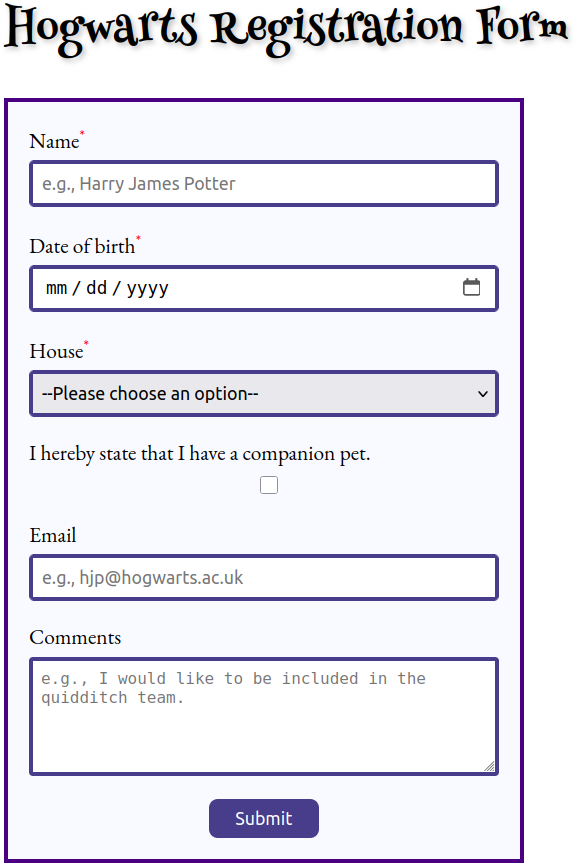
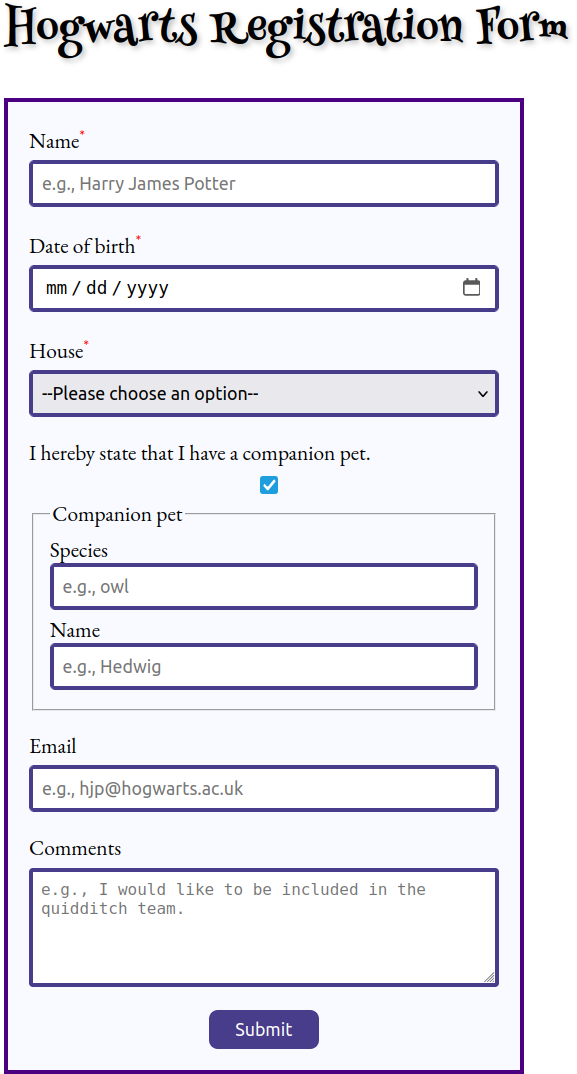
When the user clicks on the *Submit* button, form data must be sent to [Webhook.site](https://webhook.site/) in a `POST` request.
Note that the CSS stylesheet requires the [`:has()`](https://developer.mozilla.org/en-US/docs/Web/CSS/:has) pseudo-class that is available only in recent browsers.
You should use the [Henny Penny](https://fonts.google.com/specimen/Henny+Penny) font for displaying the heading.
You should use the [EB Garamond](https://fonts.google.com/specimen/EB+Garamond) font for displaying running text.
## Additional tasks
1. Modify the form such that choosing a house should change the background color of the page to the primary color of the house. The primary colors of the houses are taken from [here](https://www.wizardingworld.com/writing-by-jk-rowling/colours):
* Gryffindor: red,
* Hufflepuff: yellow,
* Ravenclaw: blue,
* Slytherin: green.
1. Add a form control to enter the number of wands, i.e., a non-negative integer ([``](https://developer.mozilla.org/en-US/docs/Web/HTML/Element/input/number)).
1. Add a form control to upload a photo in PNG or JPEG format ([``](https://developer.mozilla.org/en-US/docs/Web/HTML/Element/input/file)).
1. Add the question *Would you like to visit the Ministry of Magic?* to the form, for which the options *Yes* and *No* must be chosen with radio buttons ([``](https://developer.mozilla.org/en-US/docs/Web/HTML/Element/input/radio)).
1. Modify the form such that the house must be chosen using a group of radio buttons ([``](https://developer.mozilla.org/en-US/docs/Web/HTML/Element/input/radio)). The options must be shown on top of each other.
1. Add a password field ([``](https://developer.mozilla.org/en-US/docs/Web/HTML/Element/input/password)) to the form. Use the `pattern` attribute to express the following requirements:
* The password must contain six or more characters.
* Only English letters and decimal digit characters are allowed.
* A password must contain both English letters and decimal digit characters.
1. Add a checkbox to the form with the following label: *I let the Sorting Hat choose a house for me*. When the checkbox is checked, the form control for choosing the house must become disabled. Note that this requires JavaScript; see the [`disabled`](https://developer.mozilla.org/en-US/docs/Web/API/HTMLSelectElement/disabled) property.
1. Add another password field to the form to re-enter the password. The two passwords entered must match to submit the form. Note that this requires the use of JavaScript.
1. If the age calculated from the date of birth entered is less than 11 years, then clicking on the *Submit* button must result in an error with the following message: *You are too young for Hogwarts, the lower age limit is 11 years*. Note that this requires the use of JavaScript.
## Recommended reading
* [Client-side form validation (MDN)](https://developer.mozilla.org/en-US/docs/Learn/Forms/Form_validation)
* [The Modern JavaScript Tutorial -- Date and time](https://javascript.info/date)