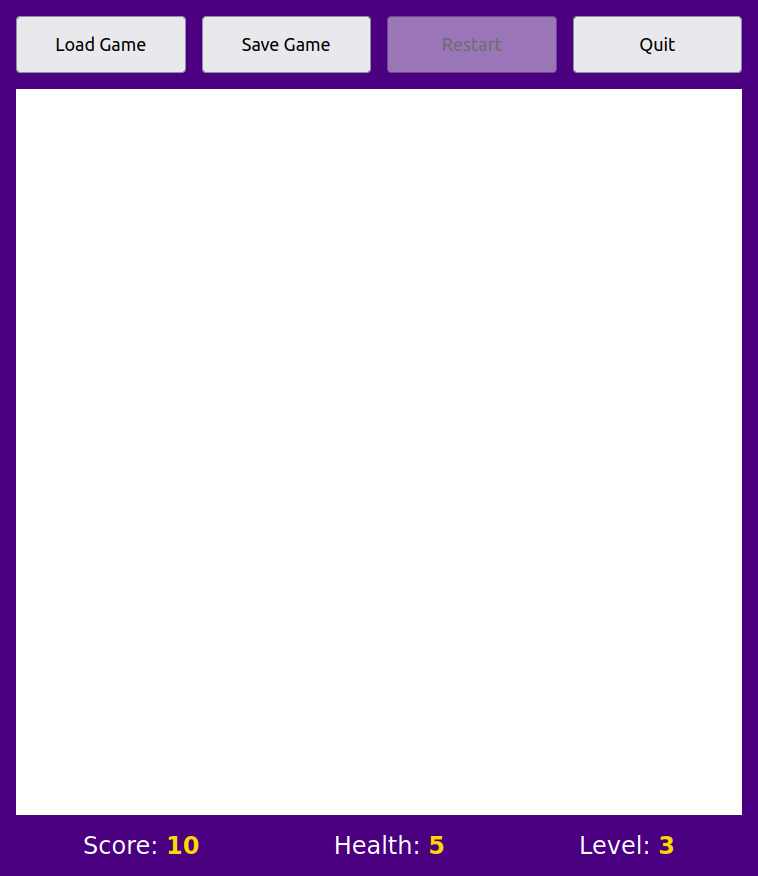
Create an HTML document and a CSS or SCSS stylesheet to display the user interface for a hypothetical dungeon game.
The user interface of the game must be presented in the browser as follows:
The bluish space around the user interface and also the gap between
the buttons must be 1rem exactly. The outer element with
the grayish background must tightly wrap the inner elements
(width: fit-content).
A game scene must be shown in the white area in the middle. The game scene must be represented as a table with 11 rows and columns.
All cells must have the same width and height. Each of the cells must have a suitable background color (that can’t be white!):
The cells of the first and the last row, and also the first and the last column represent walls whose background color must be set to black.
25 or more inner cells must also represent walls shown in black. You must add the inner wall cells to create a dungeon-like structure.
For the remaining cells, you must use two or more different background colors to represent different terrain conditions (e.g., stone, water).
The non-wall cells of the table must be populated with Unicode emoji symbols taken from here as follows:
10 or more non-wall cells must contain a symbol representing a monster of two kinds. You must use two different symbols (e.g., bat and spider), and each must occur the same number of times. Pick two symbols from here.
5 or more non-wall cells must contain a symbol representing a specific object (e.g., a gemstone or an old key) (pick one from here).
One non-wall cell must contain a unique symbol representing a hero, e.g., a man standing. Unique means that the symbol must occur only once in the table.
The resulting scene should look like an underground and look thrilling.
The HTML document must also contain a suitable element that includes your full name and Neptun ID, these elements must be shown in the browser.
It is forbidden to use the style attribute
in the HTML document. To provide a solution that is easy to
maintain, styling must be based on the class attribute. The
cells of the unique symbols are exceptions; for these, you can also use
the id attribute alongside the class
attribute.
It is forbidden to include Unicode emoji symbols directly
in the HTML document. Instead, they must be specified
exclusively in the CSS stylesheet in the value of the
content CSS property. All the Unicode emoji symbols can be
referenced either literally or by their hexadecimal code
point.
Solutions that are not based on the use of the
class attribute are rejected. The same applies to solutions
in which the HTML document contains Unicode emojis
directly.
Solutions must use the proper HTML elements the right way. For
example, you can’t use <div> elements to represent
buttons, since HTML provides an element to represent buttons.
The layout of the top and the bottom parts must be based on the use of Flexbox.
You should properly indent both the HTML document and the stylesheet. Note that improper indentation makes your code harder to read, understand, and change. Improper indentation decreases the score of your submission.
You should use meaningful class names in the class
attribute.
Note that the class HTML attribute can contain a
space-separated list of class names, such as
<td class="swamp frog highlight">.
Selectors can also contain multiple class-selectors, such as
td.swamp.frog.
Source code can be formatted with the Ctrl+Shift+I command (i.e., Format Document).
Note that when you position the mouse pointer over the name of a property in a CSS stylesheet in Visual Studio Code, the editor shows a pop-up, where you can click on MDN Reference to navigate to the MDN page of the property.
You must submit the following two files:
.html file extension..css
file extension. Otherwise, if you use Sass, an SCSS style sheet with the
.scss file extension.You may pack the two files into a ZIP archive; however, it is not mandatory. Archive formats other than ZIP are rejected.
Note that Moodle won’t let you submit more than two files.
You can access only the following websites:
The Moodle activity to submit the solution.
MDN Web Docs (You must use the English version of MDN pages!)
The solutions for the classroom assignments from here: https://arato.inf.unideb.hu/jeszenszky.peter/webtech/lab/